
Views
The view is a function from your app's state to its interface. myzig calls it on the main thread to build a frame after input, a resize, while something animates, and when the app asks. It takes a pointer to your state and the window's *ui.Context:
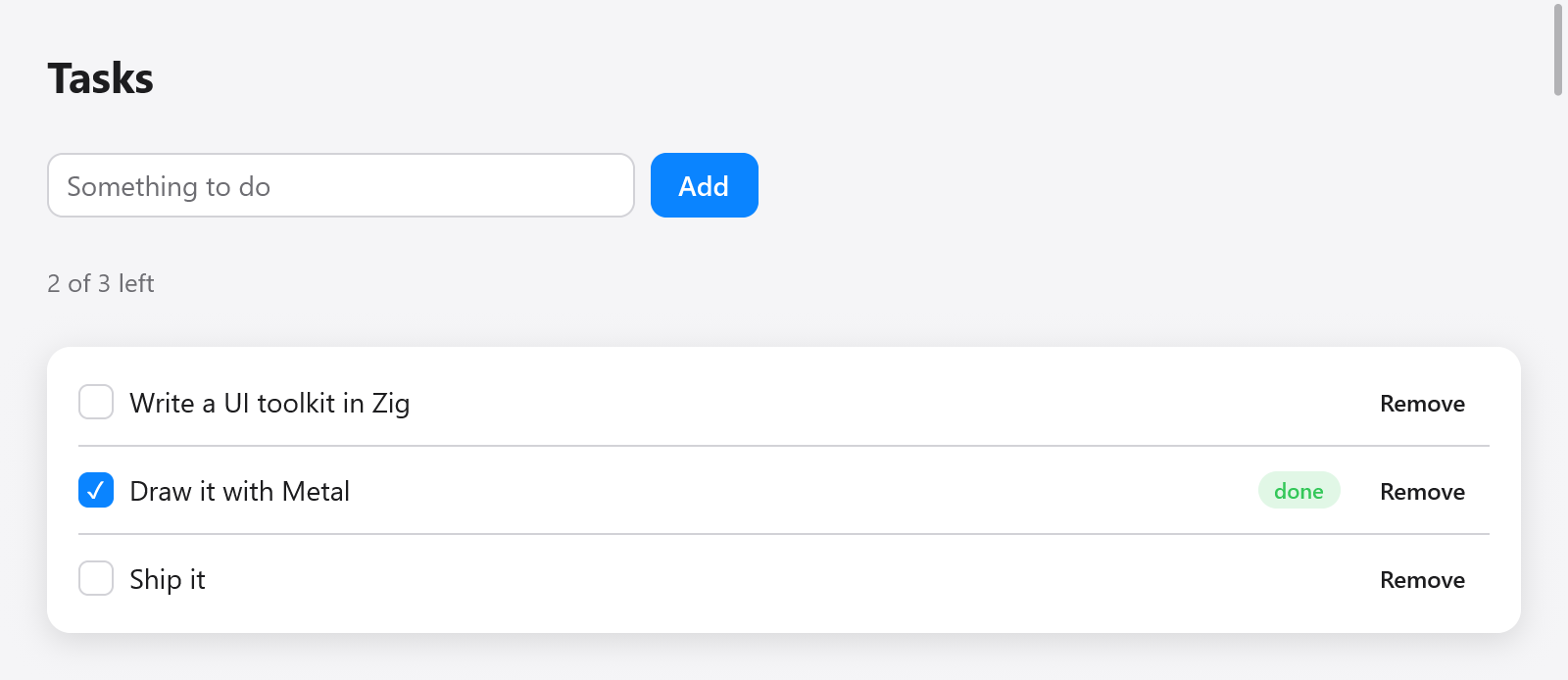
A view built from application state: a task list with completed and pending items.
const Todos = struct {
    items: [32]Item = undefined,
    count: usize = 0,
    draft: ui.TextBuffer = .{},

    const Item = struct { title: [64]u8, len: usize, done: bool };

    fn view(s: *Todos, c: *ui.Context) void {
        ui.column(c, .{ .width = .fill, .height = .fill, .padding = .all(16), .gap = 8 });
        defer ui.end(c);
        for (s.items[0..s.count]) |*it| {
            ui.key(c, c.print("todo-{d}", .{@intFromPtr(it)}));
            _ = ui.checkbox(c, it.title[0..it.len], &it.done);
        }
        if (ui.textField(c, &s.draft, .{ .placeholder = "New to-do" }).submitted) {
            s.add(s.draft.text());
            s.draft.clear();
        }
    }

    fn add(s: *Todos, title: []const u8) void {
        if (s.count == s.items.len or title.len == 0) return;
        const n = @min(title.len, 64);
        s.items[s.count] = .{ .title = undefined, .len = n, .done = false };
        @memcpy(s.items[s.count].title[0..n], title[0..n]);
        s.count += 1;
    }
};
Make the state once, as the app starts, and give its view to the window:
var state: Todos = .{};
_ = try app.newWindow(.{ .title = "To-dos", .content = .{ .view = .init(&state, Todos.view) } });
ui.View.init(&state, Todos.view) pairs the pointer with the function: any fn (ptr: *T, c: *ui.Context) void works, so a view can be a method or a free function. The same ui.View can be given to several windows; each window has its own context, so its own focus, scroll offsets and animated values.
The examples in these guides are parts of such a view: c is the view's *ui.Context and s the pointer to your state. Values that last, such as a router, a ui.TextBuffer or a widget's state struct, are fields of the state, never locals of the view, which runs for every frame.
Boxes, opened and ended
A view is a tree of boxes. Containers open a box that the next calls go into, until it is ended:
ui.row(c, .{ .gap = 8 });
defer ui.end(c);
ui.text(c, "Name", .{});
ui.spacer(c);
_ = ui.button(c, "Edit", .{});ui.column, ui.row, ui.card, ui.scroll and ui.pressable each open a box that ui.end closes; ui.div(c) returns a ui.Div whose own end closes it. Widgets that take children of their own (a form's field, a popover's panel, a tab's page) return a value with an end method too. defer keeps each end beside its open; for a box in the middle of a function, a block { ... } with a defer inside scopes it.
Interactions and the second build
Widgets answer from the previous frame's layout. When the pointer goes down, myzig hit-tests the boxes as they were last laid out, so ui.button(...).clicked is true in the build that handles the click, before the new frame is laid out.
A widget whose interaction changes the app's state sets c.changed. At the end of the build, if c.changed is set, myzig builds the frame again (with the input's edges, the click and the key, already consumed) and only then lays it out and draws it. The screen therefore always shows the state after the event. c.stats.passes counts the builds of the last frame.
Code of your own that changes state in response to input (a ui.Div's clicked, a shortcut) gets the second build for free; if you read the input yourself and change the state, set c.changed = true.
Ids and keys
Each box has an id, made from its parent's id and its place among its siblings. Focus, hover, scroll offsets, animated values and text field carets are kept by id between frames, so ids must stay stable.
When boxes come and go before others (a list that is filtered, sorted or edited), give each item a key: ui.key(c, k) names the next box, and its id is then made from the key rather than its place. Keys are strings; use something that identifies the item, not its index:
for (s.files) |f| {
    ui.key(c, f.path);
    s.fileRow(c, f);
}
c.keyed(value) (or ui.keyed(c, value)) keys the next box by any value Zig compares, as std.meta.eql tells two apart, with values of different types apart: a pointer keys the object it points to, whatever the object holds, so an item's pointer serves as its key as well as an id does; an integer, an enum, or a struct of them keys by its value, without formatting a string:
for (s.todos.items) |*todo| {
    c.keyed(todo);
    todoRow(c, todo);
}
The same goes for a single box shown only sometimes (a mark on hover) before a button: it moves the button's id, and a press in between is lost. Key the button, or always build the box and hide it with its look (custom widgets). Debug builds log a warning when a press is lost so, and when a scrolled box's id changes so that its offset starts over or jumps.
c.peekId(null) returns the id the next box will get, for widgets that need it before they open their box.
The context
ui.Context is the window's, and lasts as long as it. The fields views read:
| field | what it is |
|---|---|
theme | the frame's colors and fonts (styling) |
size | the window's content size, in points |
scale | pixels per point |
dt | seconds since the previous frame |
time | seconds since the first frame, the clock of animations a view drives itself |
frame | the frame's number |
input | this event's input: the pointer, buttons, keys, text, wheel |
stats | what the last frame cost (ui.FrameStats) |
And the ones views set:
| field or method | what it does |
|---|---|
changed = true | builds the frame again before drawing it |
c.animationFrame() | asks for another frame at the next refresh |
c.frameIn(seconds) | asks for a frame within seconds (a clock's next second) |
wants_moves = true | every pointer move draws a frame (a graph's crosshair); cleared each frame |
wants_keys = true | key presses and releases come as input.key_down / input.key_up (games) |
wants_wheel = true | the wheel comes as input.scroll where nothing scrolls |
cursor = .resize_left_right | the pointer's shape (ui.Cursor) |
title_bar_height | how much of the top moves a window with a hidden title bar |
c.setZoom(z) | scales every text by z (0.5 to 3), as an app's ⌘= and ⌘- |
c.print(fmt, args) formats into the frame's memory and c.alloc() gives that allocator itself; both are freed when the next frame begins.
Shortcuts
c.shortcut takes a key combination when this event is it:
if (c.shortcut(.{ .key = 'k', .cmd = true })) s.clear();
if (c.shortcut(.{ .key = ui.Shortcut.escape })) s.closePanel();
Command means Control off macOS, so one shortcut serves every platform. Characters are lowercase; other keys are constants such as ui.Shortcut.up, .enter and .tab. A shortcut the view takes goes no further in the frame (c.shortcut_taken is set). ui.keys.label writes a combination, given at compile time with the Mac's symbols, as the platform does ("⌘P" becomes "Ctrl+P" on Linux and Windows), for ui.kbd. For shortcuts with a name, a menu item and a palette entry, see ui.Actions.
Focus and the keyboard
Controls take the keyboard focus when pressed, and Tab and Shift-Tab move it through them in the order they were built. A control focused from the keyboard draws a ring in the accent color (c.focus_visible). Enter and Space click a focused button, checkbox or switch; the arrows move sliders, radio groups and ratings.
Changing the state from outside
The view reads your state on the main thread. Work done elsewhere (a timer, a process's output, a network reply) changes the state on the main thread and then asks the window for a frame with Window.redraw:
fn tick(ctx: ?*anyopaque) callconv(.c) void {
    const s: *State = @ptrCast(@alignCast(ctx));
    s.seconds += 1;
    s.window.redraw();
    myzig.App.after(1000, ctx, tick);
}

// In main, after the window is made:
myzig.App.after(1000, &state, tick);
App.after runs a function on the main thread after a delay. From other threads, hand the work to the main thread first: the mainthread plugin posts jobs to the main thread's own queue on every platform. Within the view, prefer c.frameIn(seconds) for what changes on a schedule (a clock, a spinner): it asks for that frame only, without drawing every refresh in between.
Text and input that a view takes itself
A widget that edits text in its own way reads c.input.ops, the text operations of the event (ui.TextOp: inserted text, an input method's composition, commands such as .delete_backward or .move_word_left), and sets c.focused_text to tell the input method where the caret is. See text input and custom widgets.