
Text
ui.text shows a string in a ui.TextStyle; ui.textf formats it first, into the frame's memory:
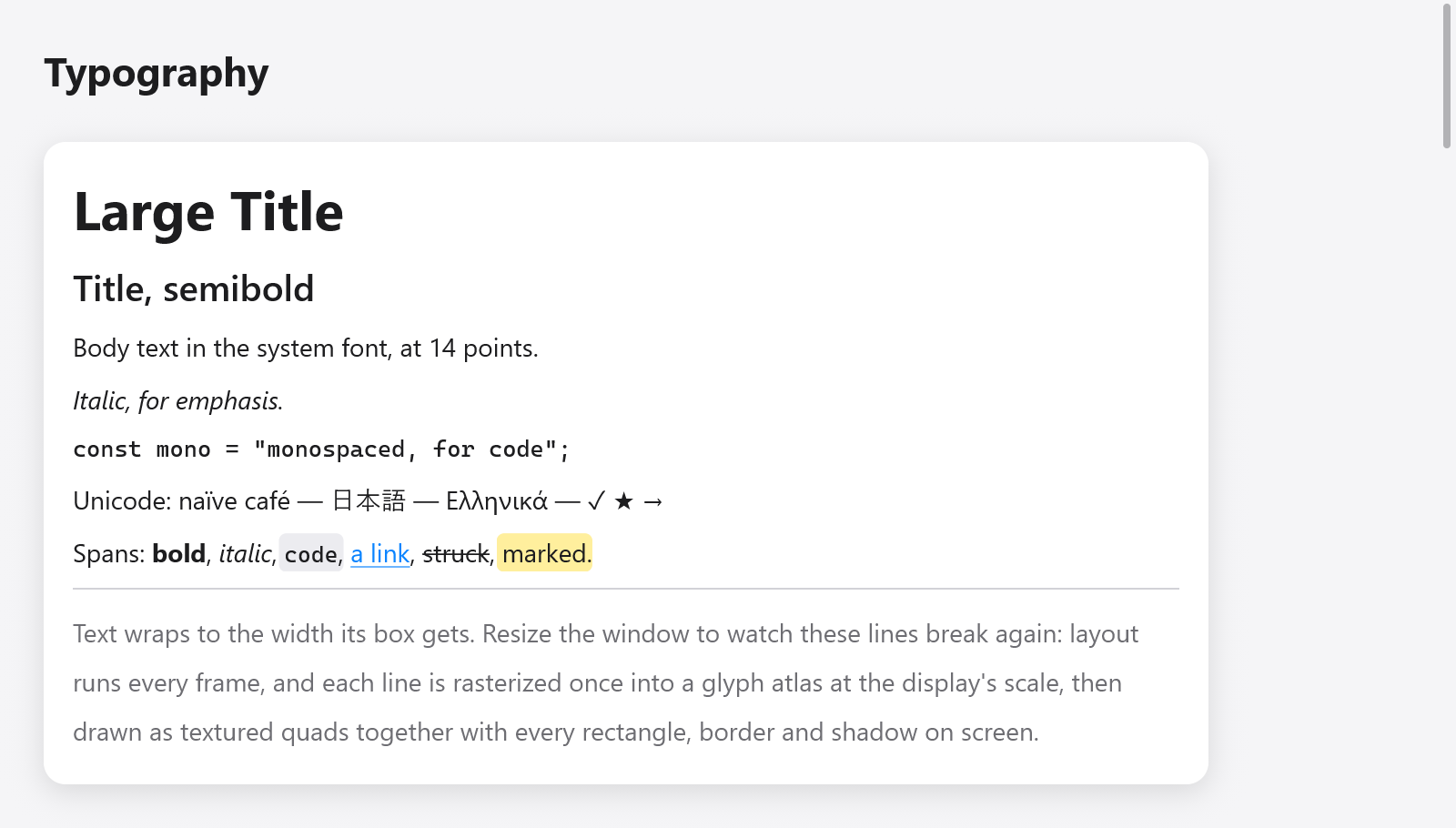
System-font headings, italic and monospaced text, rich spans and wrapped text.
ui.text(c, "Large Title", .{ .size = 30, .weight = .bold });
ui.text(c, "Italic, for emphasis.", .{ .italic = true });
ui.text(c, "const mono = \"monospaced, for code\";", .{ .mono = true, .size = 13 });
ui.textf(c, .{ .mono = true, .size = 12 }, "{d:.0}%", .{s.volume * 100});
The string (and a rich text's spans) is copied into the frame's memory: layout measures it and paint draws it after the view returns, so the view may free or change its own copy right after ui.text, as two panes rebuilding one list of names in turn do. Strings in the frame's memory (c.print, c.alloc()) are copied too; for a text of many megabytes, show the part in view (as ui.textArea and ui.codeEditor do).
Style
| field | default | what it does |
|---|---|---|
size | 14 | the font's size, in points |
weight | .regular | .regular, .medium, .semibold or .bold |
color | c.theme.text | the text's color |
wrap | false | breaks lines to fit the width the parent gives |
mono | false | the monospaced font |
italic | false | the italic face, or the regular one slanted where the family has none |
leading | 1 | the line height as a multiple of the font's (1.4 or 1.5 for airy prose) |
family | null | a family of its own, in place of the theme's (font or mono_font) |
features | "" | OpenType features by commas: "calt=0,ss01", "-liga", "+zero" (DirectWrite and HarfBuzz) |
weight_value | 0 | a weight from 100 to 900 in place of weight's; 0 for weight |
Text that does not wrap is as wide as it is. Text that wraps takes the width its parent gives (.fill) and breaks at spaces onto as many lines as it needs; in a row with too little room it gives room back, so a label beside a button wraps rather than pushing the button out:
ui.text(c, "Text wraps to the width its box gets. Resize the window to watch these lines break again.",
    .{ .wrap = true, .color = c.theme.muted, .leading = 1.4 });
Headings and labels
ui.heading(c, str) is a 22-point bold title, which assistive technology reads as a heading; ui.label(c, str) is 13-point text in the muted color, for captions and secondary information.
ui.heading(c, "Settings");
ui.label(c, c.print("{d} of {d} left", .{ left, total }));
Rich text
ui.richText(c, str, spans, style) draws one paragraph whose byte ranges have looks of their own. Each ui.Span covers bytes [start, end) and may set:
| field | what it does |
|---|---|
color | the text's color (ANSI output, syntax highlighting) |
weight | another weight |
italic | italics |
mono | the monospaced font (inline code), a little smaller to match |
background | a fill behind the text (a mark, inline code) |
underline, strike | a line under or through it |
const s = "Spans: bold, italic, code, a link, struck, marked.";
// Spans are copied, as the string is: the frame's memory or the app's.
const spans = c.alloc().dupe(ui.Span, &.{
    .{ .start = 7, .end = 11, .weight = .bold },
    .{ .start = 13, .end = 19, .italic = true },
    .{ .start = 21, .end = 25, .mono = true, .background = c.theme.surface_hover },
    .{ .start = 27, .end = 33, .color = c.theme.accent, .underline = true },
    .{ .start = 35, .end = 41, .strike = true },
    .{ .start = 43, .end = 49, .background = ui.Color.hex(0xffd60a).alpha(0.4) },
}) catch &.{};
ui.richText(c, s, spans, .{ .wrap = true });
Spans that only color, fill or underline text keep the fast path of plain text; spans that change the font (a weight, italics, monospace) shape the paragraph as runs, wrapped across them. Both are cached across frames as plain text is.
For whole documents, see Markdown, which draws headings, lists, code blocks and tables from Markdown text, and the rich text editor for text the user styles.
Selectable text
A box styled selectable = true lets the pointer select its texts, and its children's, as a terminal's or a page's: a press on text starts a selection, a drag extends it across lines and boxes in reading order, and Copy (⌘C or Ctrl+C, or the Edit menu) copies it, unless the focused text field has a selection of its own. A drag that selects is not a click.
ui.column(c, .{ .selectable = true, .gap = 6 });
defer ui.end(c);
for (s.log_lines) |line| ui.text(c, line, .{ .mono = true, .size = 12 });
Controls inside a selectable box (control = true, as buttons, toggles and links are) keep their texts out of the selection, so the pointer is a hand all over them.
Fonts
On macOS, text is shaped and measured by CoreText in the system's fonts (SF Pro and SF Mono). On Linux and Windows, and on macOS built with -Dportable=true, myzig shapes text itself from the installed TrueType and OpenType fonts (src/ui/tt/): the system's font folders are read once, each face known by its family, weight, italics and width, and loaded when first used, with kerning, and fallback fonts for characters a font lacks. Browsers get the fonts the site bundles (see browsers).
The theme names the families, null for the system's:
var t = ui.Theme.light;
t.font = "Inter";
t.mono_font = "JetBrains Mono";
_ = try app.newWindow(.{ .title = "Notes", .theme = t, .content = .{ .view = .init(&state, State.view) } });
A family that is not installed falls back to the system's. Matching a style picks the family's nearest face: its bold for .bold, its italic for .italic, else the regular face slanted by about 11 degrees.
How text is drawn
A run of text is shaped once into a layout (glyphs, positions and the fonts fallen back to) that measuring and painting share. Layouts are cached while they are used, so a label that stays the same costs nothing to lay out again. Glyphs are rasterized once into a glyph atlas at the display's scale and drawn as textured quads with every rectangle, border and shadow in the frame, so text that changes every frame (a counter, a clock) costs a shaping and no rasterizing. On macOS the exact fast path for printable ASCII (src/ui/shaper.zig) skips CoreText for most labels, and a test proves it lays text out as CoreText does.
Shaping is the system's: CoreText on macOS, DirectWrite on Windows (src/ui/text_dw*.zig: script itemization, its font fallback, glyph placement, grayscale rasterization, color emoji), and HarfBuzz with FreeType and fontconfig on Linux (src/ui/text_hb*.zig, text_ft.zig, text_fc.zig, all loaded at run time; color emoji from their color bitmaps). Text in several directions is split into runs by the Unicode bidirectional algorithm (src/ui/bidi.zig, UAX #9) and laid out in visual order; carets move in logical order and selections across directions show as several ranges. Arabic letters join, ligatures a font has are used, and characters a font lacks (CJK, emoji) come from fallback fonts. Simple text whose characters were seen takes a fast path that gives the same layout. Where the libraries are missing (a bare Linux, browsers), myzig's own TrueType reader (src/ui/tt/) shapes text as before.
Zoom
c.setZoom(z) scales every text of the window by z, from 0.5 to 3, as an app's ⌘= and ⌘- do; boxes sized by their text grow with it. The desktop's text size comes through ui.preferences.apply, which sets the zoom.
Icons
ui.icon draws a symbol by name, in the text's flow; see buttons and small things.