
Rich text editor
ui.richTextEditor edits text with formats, as Notes and Google Docs do: paragraphs with styles (headings, quotations, code, bulleted, numbered and task lists nested by levels) of text with marks (bold, italics, underline, strikethrough, code, links, colors and highlights). It has undo, the clipboard (its own rich copy, plain text and Markdown), input methods, Markdown shortcuts as you type, and builds only the blocks in view. ui.richTextToolbar is a toolbar of its formats.
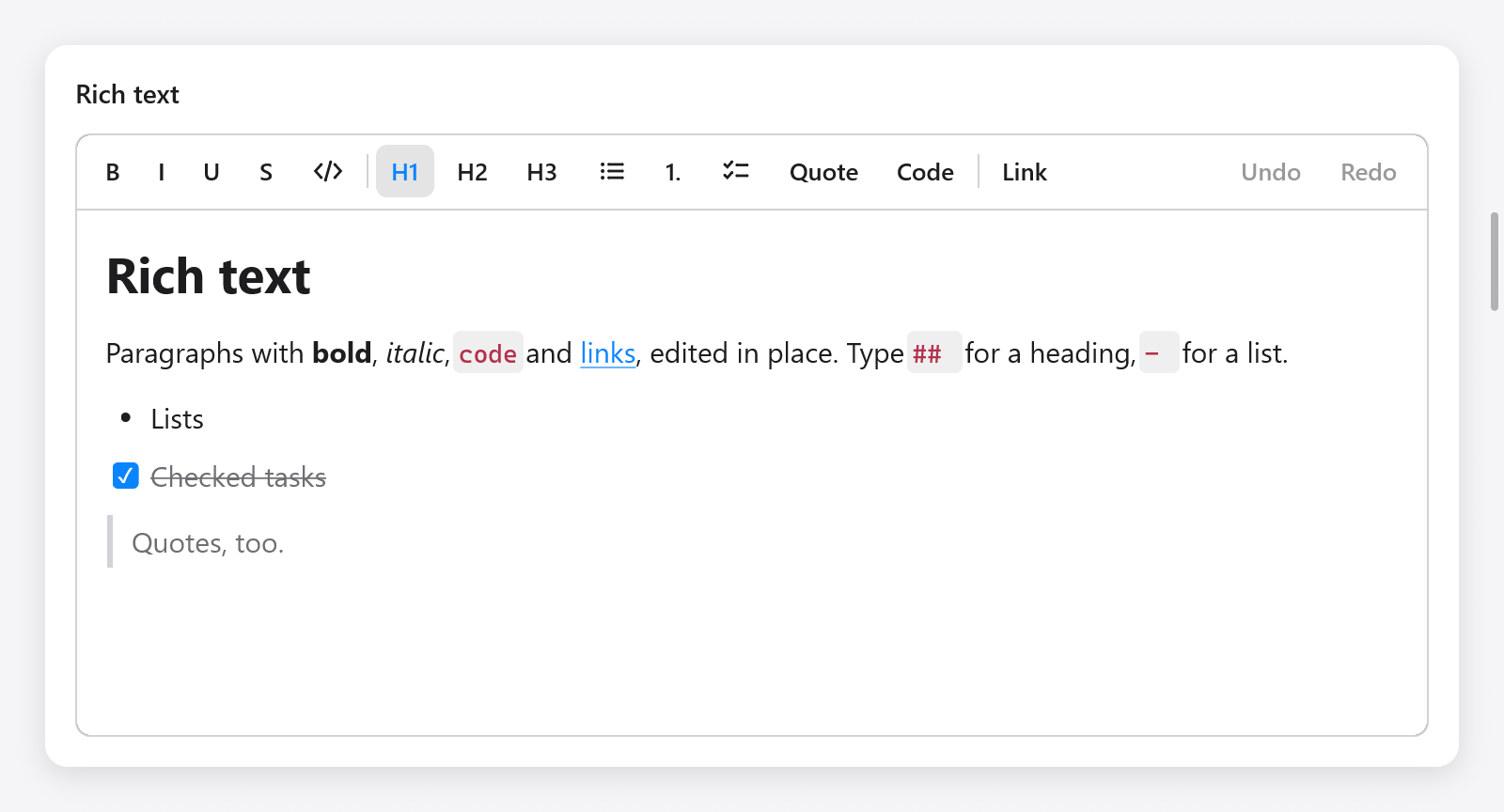
The rich text editor and toolbar, with headings, inline formatting, tasks and a quote.
const Note = struct {
    rt: ui.RichText,

    fn view(n: *Note, c: *ui.Context) void {
        ui.column(c, .{ .width = .fill, .height = .fill });
        defer ui.end(c);
        _ = ui.richTextToolbar(c, &n.rt, .{});
        if (ui.richTextEditor(c, &n.rt, .{ .placeholder = "Write" }).changed) n.save();
    }
};

var note: Note = .{ .rt = .initMarkdown(gpa, "# Groceries\n\n- [ ] Milk") };
defer note.rt.deinit();
zig build run-notes is a notes app built on it (examples/notes): notes in a sidebar, links asked for in a bar, and the clipboard as plain text or Markdown.
The state
A ui.RichText holds the document (doc), the selection (sel), the history, the composition of an input method, and what the view keeps between frames. Make it with ui.RichText.init(gpa) (empty) or initMarkdown(gpa, md), free it with deinit().
| method | does |
|---|---|
setMarkdown(md) | replaces the document with Markdown read |
markdown(gpa) | the document written as Markdown |
text(gpa) | its plain text, blocks on lines of their own |
selectedText(gpa) | the selection's plain text |
takeChanged() | whether it was edited since the last call |
select(anchor, caret), collapse(pos), selectAll() | the selection |
insert(s) | types s at the caret, with the marks typing has there |
deleteBackward(), deleteForward(), deleteSelection() | |
newline() | Enter: splits the block (or leaves an empty list item) |
undo(), redo(), canUndo(), canRedo() | |
toggle(t) | toggles a ui.richtext.Toggle (.bold, .italic, .underline, .strike, .code) on the selection |
setMark(m) | sets a ui.richtext.Mark (.{ .color = c }, .{ .highlight = null }, ...) on the selection |
setLink(url) | links the selection (or the link at the caret); "" removes it |
setKind(kind) | the style of the selected blocks |
indent(delta) | a list's level, or a paragraph's indentation, by delta |
toggleChecked(block) | checks or unchecks a task |
formatting() | the selection's ui.richtext.Formatting, for a toolbar |
pasteMarkdown(md) | pastes Markdown at the caret |
version is bumped by every edit, undo and redo.
Positions are ui.richtext.Pos: a block index and a byte offset off in it. A selection (ui.richtext.Sel) has an anchor and a caret.
The document
ui.richtext.Doc is a list of blocks. A block (ui.richtext.Block) has a style and text in runs of marks:
ui.richtext.BlockStyle:kind,indent(a list item's level, or how far a paragraph is indented, up to 6) andchecked(a task's).ui.richtext.Kind:.paragraph,.heading1,.heading2,.heading3,.quote,.code,.bullet,.numbered,.task.ui.richtext.Marks:bold,italic,underline,strike,code,link(the index of its URL in the document, plus one; 0 none),colorandhighlight(optional colors).
doc.count(), doc.block(i) (its str() and marksAt(i)), doc.append(style, text, marks), doc.url(link) and doc.text(gpa) read and build it. ui.richtext.parseMarkdown(gpa, md) and ui.richtext.writeMarkdown(gpa, doc) convert it.
Text typed right after a link or code doesn't extend them, as in NSTextView; a format toggled with nothing selected applies to what is typed next, until the caret moves.
Options
ui.RichTextOptions:
| field | default | meaning |
|---|---|---|
width, height | .fill | |
size | 15 | the body's size; headings and code scale from it |
placeholder | "" | shown while empty |
read_only | false | selectable, copyable and its links clickable, not editable |
bare | false | no box of its own (border, fill, focus ring) |
padding | 16 × 12 | around the text |
markdown_shortcuts | true | typing # , - , **bold** formats |
clipboard | .plain | what copy writes besides the rich copy, and what text from elsewhere pastes as: .plain or .markdown |
It returns a ui.RichTextResult: changed, focused, first_block and last_block (the blocks built), link_clicked (a link clicked, with Command or Control while editable: its URL) and link_requested (Command-K or Control-K asked for a link: show a field, then call setLink).
ui.richTextEditorBase(c, rt, box, options) is the editor in a box you style yourself (a ui.Style).
Links
The editor doesn't ask for URLs itself: it tells the app. A bar under the toolbar, as in the notes example:
const tb = ui.richTextToolbar(c, &n.rt, .{});
const r = ui.richTextEditor(c, &n.rt, .{ .bare = true });
if (tb.link_requested or r.link_requested) {
    s.asking_link = true;
    s.link.set(n.rt.formatting().link orelse "https://");
}
if (s.asking_link) {
    const f = ui.textField(c, &s.link, .{ .width = .fill, .placeholder = "https://" });
    if (ui.button(c, "Set", .{ .variant = .primary }).clicked or f.submitted) {
        n.rt.setLink(s.link.text());
        s.asking_link = false;
        c.focus = n.rt.id; // back to the editor
    }
}
if (r.link_clicked) |url| _ = myzig.shell.openUrl(url);
The toolbar
ui.richTextToolbar(c, rt, options) has buttons for bold, italics, underline, strikethrough and code, headings, lists, quotations and code blocks, a link and, with history, undo and redo. Its buttons show the selection's formats (from formatting()), and a click formats the editor and gives it back the keyboard. ui.RichTextToolbarOptions has border and history (both true). It returns changed (a format was applied) and link_requested.
Keys
Command on macOS, Control elsewhere, as word processors bind them:
| keys | does |
|---|---|
| Mod+B, Mod+I, Mod+U | bold, italics, underline |
| Mod+Shift+X | strikethrough |
| Mod+E (macOS), Ctrl+Shift+E | code |
| Mod+K | asks for a link |
| Mod+Option+1, 2, 3, 0 | heading 1 to 3, paragraph |
| Mod+Shift+7, 8, L, 9 | numbered list, bulleted list, tasks, quotation |
| Mod+Option+C | code block |
| Mod+], Mod+[, Tab, Shift+Tab | indent and outdent (Tab in lists) |
and the text's movement, deletion, selection, clipboard and undo, as a text area's. A click on a task's box checks it.
Markdown shortcuts
What is typed formats itself. At a paragraph's start, # to ### make headings, - , * and + bulleted lists, 1. numbered ones, [ ] and [x] tasks, and > a quotation; ``` then Enter a code block. Around words, **bold**, *italic*, _italic_, `code` and ~~struck~~ format what they hold as the closing mark is typed; an underscore inside a word, as in snake_case, stays one. Each shortcut is a step of undo of its own, which takes it back to what was typed.
The clipboard
Copying puts plain text (or, with clipboard = .markdown, Markdown) on the system clipboard, and keeps the selection itself with its styles and marks: pasting that text again, within the app, pastes the copy whole, so text moves with its formats. Text from elsewhere pastes plain, or read as Markdown.
Testing
var n: Note = .{ .rt = .init(gpa) };
defer n.rt.deinit();
var t: ui.Tester = undefined;
try t.init(gpa, .init(&n, Note.view), .{});
defer t.deinit();
try t.clickText("Write");
t.typeText("# Title");
try std.testing.expectEqual(ui.richtext.Kind.heading1, n.rt.doc.block(0).style.kind);
See src/ui/tests_richtext*.zig and Testing.