
Right to left
Arabic, Hebrew, Persian and Urdu read from right to left, and so do the interfaces of apps in those languages: a row starts at the right, a sidebar is on the right, a back arrow points right. Native UI lays a window out so once it is told to, as Flutter's TextDirection, SwiftUI's LayoutDirection and CSS's direction do (src/ui/direction.zig, after mygo's).
As in Godot, the coordinates are not mirrored: x still grows to the right in rectangles, in canvases and in the pointer's position. Only the layout is.
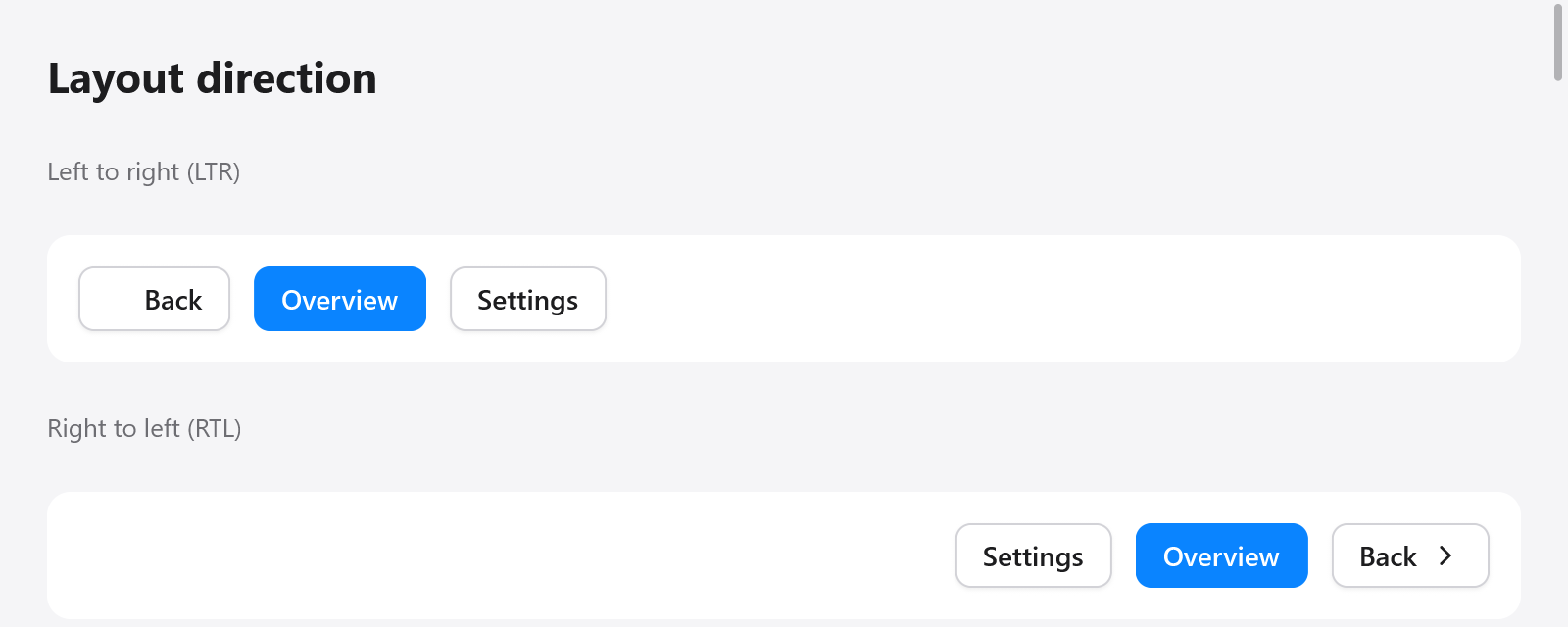
The same controls laid out from left to right and from right to left.
The direction
ui.Direction is .ltr or .rtl. A window is left to right until the view says otherwise, with ui.direction.set or, from the app's language, ui.direction.fromLocale, which gives right to left for Arabic, Hebrew, Persian and Urdu (it reads i18n.direction of the tag):
fn view(s: *App, c: *ui.Context) void {
    ui.direction.fromLocale(c, myzig.i18n.locale());
    // ...
}
The direction is kept by the window: setting it again each frame costs a lookup, and changing it builds the frame again, so that widgets built before the change read the new one.
Every box takes the direction of the box it is built in, unless it is given one of its own with ui.direction.scope, right after it is opened and before its children. A phone number, a code sample or a media player's controls stay left to right in a right-to-left window:
const player = c.open(.{ .direction = .row, .gap = 8 }, "player");
ui.direction.scope(c, player, .ltr);
_ = ui.button(c, "", .{ .icon = "backward.fill" });
_ = ui.button(c, "", .{ .icon = "play.fill" });
_ = ui.button(c, "", .{ .icon = "forward.fill" });
c.end();
Widgets of your own that draw what points along a line read the direction of what is built now:
const forward = if (ui.direction.current(c) == .rtl) "chevron.left" else "chevron.right";
ui.icon(c, forward, .{});
ui.direction.isRtl(c) says the same; ui.direction.arrows(c) gives the keys that go back and forth along a line (.back and .forth: Left and Right, swapped right to left), and ui.direction.alongLine(c, t) turns a fraction from a line's start into one from its left, as a slider's value under the pointer.
What mirrors
Right to left, once layout has placed the tree left to right, ui.direction.mirror (which layout.arrange runs) moves each box of a right-to-left box to the other side of it, with everything inside:
- A row lays its children out from the right;
align_itemsandjustifystart at the right. - Padding given on the left goes to the right, and an absolute box offset from the left is offset from the right.
- Grids place their columns from the right.
- Focus groups move to their next item with Left.
- A router's pages pushed slide in from the left.
Overlays keep the place their widget gave them, in window coordinates, and lay their insides out in the window's direction.
What does not
- Text, icons, pictures and what a canvas paints are not mirrored: a check mark, a magnifying glass and a chart read as they do left to right. Draw what must point the other way after reading
ui.direction.current. - The fills and knobs of controls that draw along a line by themselves (sliders, progress bars, switches) follow the mirrored layout of their boxes, but the controls do not yet read the direction for their fill side and arrow keys, as mygo's do. Code that needs it reads
alongLineandarrows. - The inspector reads left to right.
Trying it
The inspector's RTL button lays its window out right to left, or back, to try an interface before it is translated. A Tester lays its window out right to left after ui.direction.set(&t.ctx, .rtl), as a test of the layout would:
var t: ui.Tester = undefined;
try t.init(gpa, .init(&page, Page.view), .{ .width = 400, .height = 300 });
defer t.deinit();
ui.direction.set(&t.ctx, .rtl);
t.frame();
const back = t.findText("Back").?;
try std.testing.expect(back.x > 200); // the row starts at the right
src/ui/tests_direction.zig tests rows, alignment, padding, offsets, a box kept left to right inside, overlays, the direction from a locale, and the arrows widgets read.
The direction of an app's language comes from i18n: i18n.direction(tag), which the pseudo locale ar-XB (i18n.pseudo_bidi) also reads right to left.