
Markdown
ui.markdown shows Markdown in the window's fonts and colors: CommonMark with GitHub's tables, task lists, strikethrough and autolinks. Its text is selectable, links report their clicks, and code blocks are highlighted, in the monospaced font, with a Copy button. It is made for replies streaming in from a model: a token appended at the end of a long reply costs what it costs at its start.
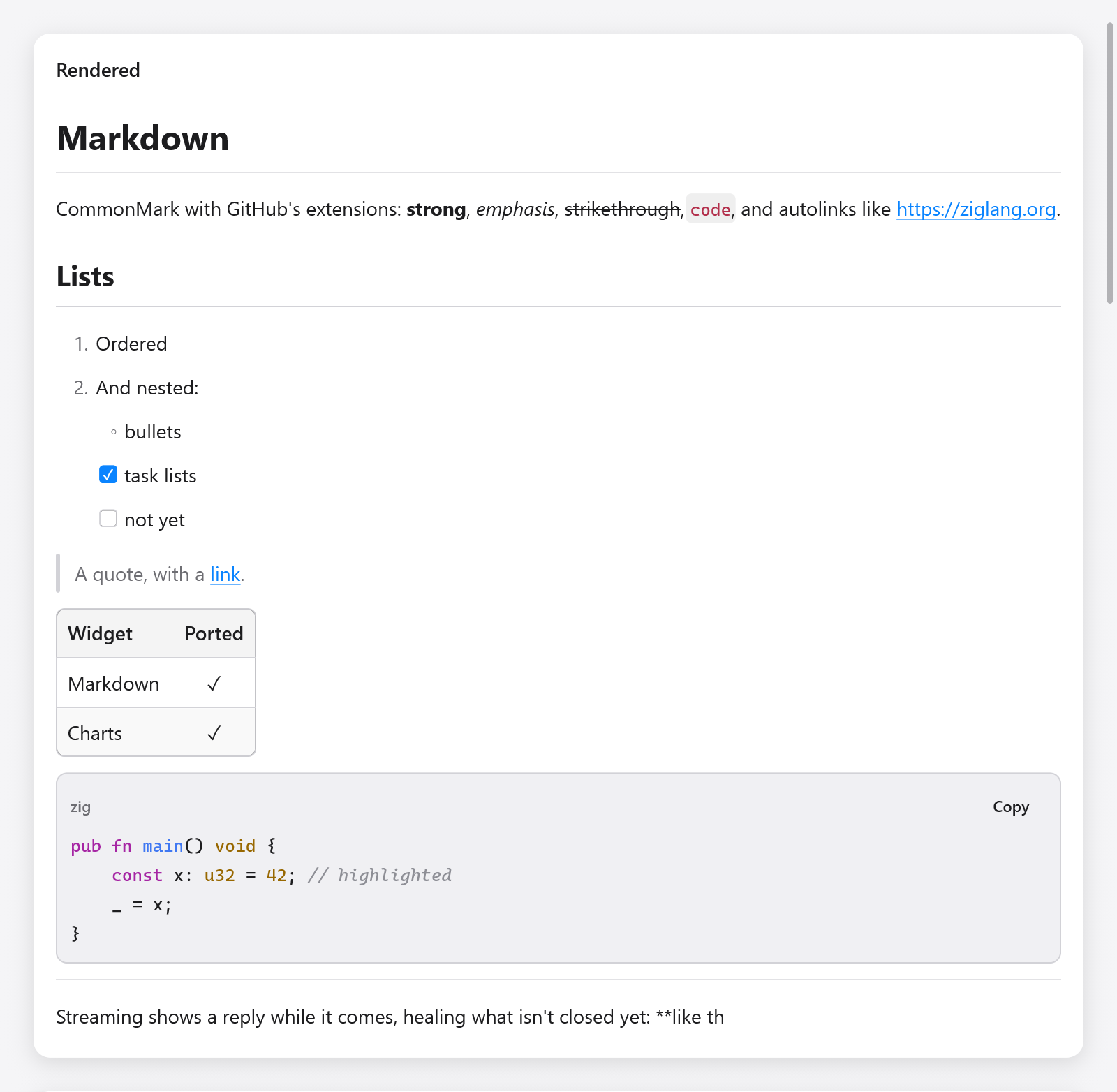
Rendered Markdown with lists, a quote, a table and highlighted Zig code.
const Message = struct {
    text: []const u8,
    md: ui.Markdown,
    done: bool,
};

fn bubble(m: *Message, c: *ui.Context) void {
    ui.column(c, .{ .width = .fill, .max_width = 700 });
    defer ui.end(c);
    const res = ui.markdown(c, m.text, .{ .state = &m.md, .streaming = !m.done });
    if (res.link) |url| _ = myzig.shell.openUrl(url);
}
zig build run-markdown-chat shows replies streaming in (examples/markdown-chat); headless: zig-out/bin/markdown-chat --myzig-snapshot=chat.png --myzig-script="wait:3".
Keeping a state
Give ui.markdown a ui.Markdown kept in the app's state, one per document shown, and the source on every frame. Make it with ui.Markdown.init(gpa) and free it with deinit().
The state keeps the parsed document and what was made of its blocks: their boxes and ids, their inlines, rendered text and highlighted lines. When the source grows, only the text appended is parsed: the outermost block still open before it, or just the new lines when none is. The blocks before it are left as they were, so the view keeps what it made of them. Any other change of the source (an edit in the middle) parses it all again, as does a change of extensions.
Without a state (.state = null), the source is parsed whole on every frame: fine for a short, fixed text.
Streaming
While streaming is set, the end of the text shows what its half-written syntax will most likely become: **bol shows bold, an open code fence shows as code, a link being written shows as its text, and lines that could still turn into something else (a --- that may be a heading's underline) wait for what follows them. Set streaming to false once the reply is done, and the end is read exactly.
Options
ui.MarkdownOptions:
| field | default | meaning |
|---|---|---|
state | null | the ui.Markdown kept across frames |
streaming | false | the text is still being written |
extensions | all on | ui.MarkdownExtensions (below) |
size | 14 | the size of body text; headings, code and spacing scale with it |
leading | 1.45 | line height, in sizes |
selectable | true | text can be selected and copied |
wrap_code | true | code blocks wrap long lines rather than clipping them |
syntax | true | color code blocks in the languages the highlighter knows |
highlighter | null | a ui.MarkdownHighlighter of your own |
max_column_width | 320 | a table's columns are at most this wide; their text wraps |
key | null | the key of the view's box |
ui.MarkdownExtensions has tables, task_lists, strikethrough and autolinks, all on by default (.gfm); .commonmark turns them all off, for strict CommonMark.
What it returns
A ui.MarkdownResult:
link: the destination of a link clicked this frame.hovered_link: the link under the pointer, as a status bar shows it.copied: the code a code block's Copy button put on the clipboard (for a toast saying so).
Links are not opened for you: open them with myzig.shell.openUrl, or route them within the app.
Code blocks
The built-in highlighter colors keywords, strings, numbers, comments, functions and types of Zig, JavaScript and TypeScript, Go, Python, JSON and shell, C-like languages (C, C++, C#, Java, Kotlin, Swift, Rust), scripting languages (Ruby, PHP, Lua, Perl, R, Julia, PowerShell, SQL), functional ones (Haskell, Elm, OCaml, F#, Elixir, Erlang, Lisps, Nix), config formats (YAML, TOML, HCL, CMake, INI) and more, chosen by the fence's info string (```zig). Markup (HTML, XML, SVG, Vue, Svelte) colors tags, attributes and their values, with the code of <script> and the rules of <style> in JavaScript and CSS; Markdown its headings, quotes, lists, emphasis, code and links; a diff its added, removed and hunk lines. It works a line at a time from the state the line before left (inside a block comment, a multiline string), so a block streaming in highlights only its new lines.
A highlighter of your own is a function that appends ui.Spans (offsets into the line, with a color, weight, italic, ...) for a line in a language, and returns false for a language it doesn't know, which falls back to plain text:
fn highlight(_: ?*anyopaque, gpa: std.mem.Allocator, language: []const u8, code: []const u8, dark: bool, out: *std.ArrayList(ui.Span)) bool {
    if (!std.mem.eql(u8, language, "ini")) return false;
    if (std.mem.indexOfScalar(u8, code, '=')) |eq| {
        out.append(gpa, .{ .start = 0, .end = @intCast(eq), .color = if (dark) .hex(0x9cdcfe) else .hex(0x0451a5) }) catch {};
    }
    return true;
}

_ = ui.markdown(c, src, .{ .state = &s.md, .highlighter = .{ .func = highlight } });
Highlighter.ctx is passed back to the function, for a highlighter with state of its own.
What is shown
- Headings (ATX and setext), paragraphs, hard and soft breaks.
- Emphasis, strong emphasis, strikethrough, code spans.
- Links and images by destination or reference, and autolinks (GitHub's
www.and bare URLs withautolinks). Images show their description (their alternative text), in italics, unless the options'images(aui.MarkdownImageReader) reads them: then each shows under its paragraph (aui.MarkdownImage: bytes under a key, or an SVG), and a paragraph of images alone leaves its descriptions out. The app resolves destinations itself, local files only, say. - Block quotes, ordered and bullet lists, nested, tight and loose, and task lists with their checkboxes.
- Fenced and indented code blocks.
- Tables, with their columns' alignment.
- Thematic breaks. HTML blocks and inline HTML are shown as their text, so nothing hides in them.
The parser passes the examples of the CommonMark 0.31.2 specification and GitHub's extensions, each parsed whole, appended a byte at a time and in chunks (src/ui/markdown/tests_spec_*.zig).
One rule is relaxed for Chinese, Japanese and Korean, which put no space around emphasis: next to a CJK character, full-width punctuation or a curly quote, * and ~~ open and close even where punctuation would stop them in CommonMark, so **结论。**后文 is bold. _ and a single ~ keep CommonMark's rule. No example of the spec has CJK text there, so all of them still pass.
The document
ui.MarkdownDocument is the parsed document, for apps that want the structure rather than the view: MarkdownDocument.parse(gpa, source, extensions) parses a text whole, and a document made with init(gpa, extensions) takes text with set(source) and append(more). Blocks are a flat array in document order, each followed by its children: len(), block(i) (its kind, level, parent, start and end in the source, ...), children(i) to iterate, language(i) of a code block, alignments(table), and inlines(i), parsed the first time they are asked for. Free it with deinit().
Testing
Markdown is text and boxes, so the Tester finds it as it finds any text:
// Chat's view calls ui.markdown and keeps a clicked link in s.clicked.
var s: Chat = .{ .md = .init(gpa) };
defer s.md.deinit();
var t: ui.Tester = undefined;
try t.init(gpa, .init(&s, Chat.view), .{});
defer t.deinit();
try std.testing.expect(t.hasText("LRU cache"));
try t.clickText("the docs"); // a link
try std.testing.expectEqualStrings("https://ziglang.org", s.clicked.?);
See Testing, and Rich text for an editor that reads and writes Markdown.