
Text area
ui.textArea edits multi-line text: wrapped or scrolled sideways, with the platform's keys, the pointer, the clipboard, undo and input methods. Its text is a ui.TextArea the app keeps, whose document is a rope, so a text of a hundred thousand lines edits as quickly as one of ten, and only the lines in view are laid out. The code editor is built on the same parts.
For one line of text, use ui.textField (Text input).
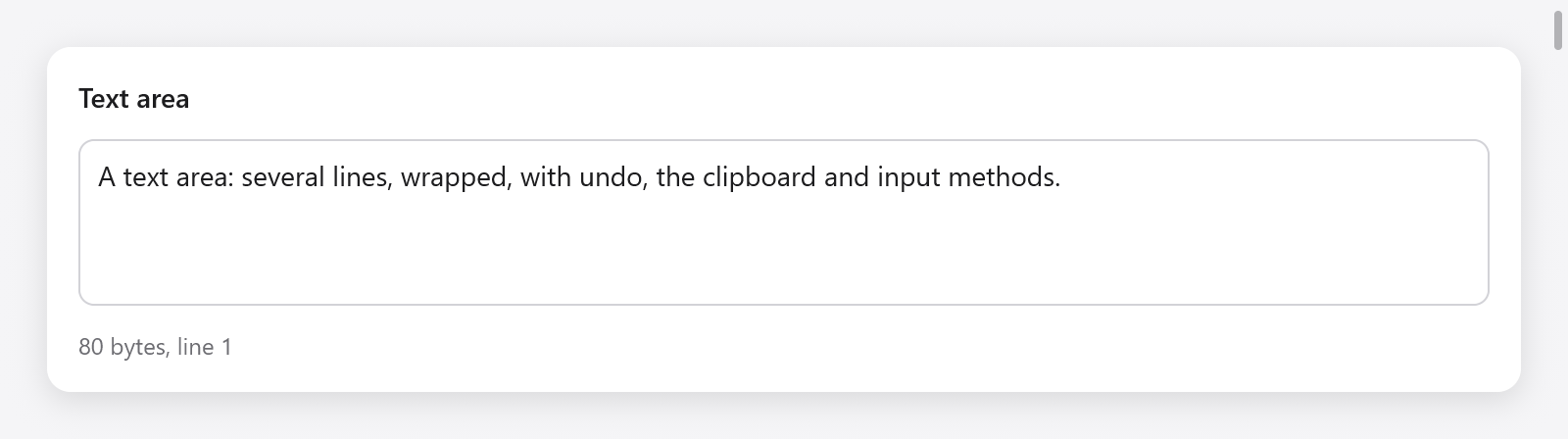
A multiline text area with its byte count and caret line.
const Notes = struct {
    body: ui.TextArea,

    fn view(s: *Notes, c: *ui.Context) void {
        const r = ui.textArea(c, &s.body, .{ .placeholder = "Notes", .lines = .{ 3, 12 } });
        if (r.changed) s.save();
    }
};

var notes: Notes = .{ .body = .init(gpa, "Hello") };
defer notes.body.deinit();
zig build run-text-buffer edits 100 000 lines (examples/text-buffer); the gallery's Text page and examples/code-editor show text areas too.
Options
ui.TextAreaOptions:
| field | default | meaning |
|---|---|---|
width | .fill | its width |
height | 140 points | its height |
lines | null | grows with its text from lines[0] rows to lines[1], past which it scrolls, as a message field does (in place of height) |
size | 14 | the text's size |
mono | false | the monospaced font |
wrap | true | wrap long lines; false scrolls them sideways, with a scroll bar |
placeholder | "" | shown while it is empty |
read_only | false | selectable and copyable, not editable |
tab | false | Tab types a tab, rather than moving the focus |
bare | false | no box of its own (border, fill, focus ring): for an editor filling a window |
It returns a ui.TextAreaResult: changed (the text changed this frame), focused, and first_line and last_line, the lines it built, with lines (each line built and its top from the top of the view, as it is scrolled, in frame memory) and row_h, for what the app puts over the lines.
Editing
Everything a text field of the platform does:
- Arrows, with Shift to select; by words with Option (macOS) or Control (Linux, Windows); to the line's ends with Command or Home and End; to the text's ends; Page Up and Page Down. Up and down keep the column they started from.
- Backspace and Delete, by characters, words, and to the line's start.
- Select all, copy, cut and paste through the system clipboard (the Tester's own in tests).
- Undo and redo. Characters typed in a row, within a second, are one step; so are deletions in a row.
- Input methods (Chinese, Japanese, Korean, dead keys): the composition is shown underlined in the text until it is committed.
- The pointer: a click places the caret, a drag selects, a double click selects a word and a triple click a line, dragging by words or lines from there; Shift-click extends the selection.
- More carets (
src/ui/textarea_multi.zig): Control-Alt (Command-Option) with Up or Down adds one a line above or below, Control-D (Command-D) selects the word at the caret and then each next match, and Control-click (Command-click) adds one where it lands. Typing, deleting, Tab, Enter, cut and the arrows then act at every caret, as one step of undo; Escape goes back to one. The others are inTextArea.extra, the main one insel.
On macOS the keys come through the text input system (NSTextInputClient), so the user's own key bindings apply; elsewhere they are mapped as the platform binds them (src/ui/textarea_keys.zig).
The state
A ui.TextArea holds the document (doc, a ui.TextDoc), the selection (sel, a ui.TextSel: anchor and caret byte offsets), the composition of an input method, and what the view keeps between frames. Make it with ui.TextArea.init(gpa, text), free it with deinit().
The app reads and changes it between frames:
| method | does |
|---|---|
text(gpa) | the whole text, in memory of gpa |
len() | its length in bytes |
setText(s) | replaces the text as an edit, which undo takes back |
reset(s) | replaces it as a new document, without history (a file opened) |
select(anchor, caret), collapse(at) | sets the selection |
selectedText(gpa) | the selection's text |
caretLine() | the caret's line, from 0 |
insert(s) | types s at the caret, as the keyboard does |
replaceSelection(s, kind), replaceRange(a, b, s, kind) | replaces text, as a step of undo |
deleteTo(at) | deletes the selection, or from the caret to at |
undo(), redo() | |
takeChanged() | whether the text changed since the last call |
wordAt(i), lineRange(line) | ranges of a word and a line |
prevChar, nextChar, prevWord, nextWord | boundaries from a byte |
if (ui.button(c, "Insert date", .{}).clicked) {
    s.body.insert(c.print("{d}-{d:0>2}-{d:0>2}", .{ y, m, d }));
}
if (ui.button(c, "Clear", .{ .disabled = s.body.len() == 0 }).clicked) s.body.setText("");
Offsets are bytes of UTF-8; the caret never stops inside a character.
The document
ui.TextDoc is the text a text area or a code editor edits: a rope, its undo history, and a log of the lines each edit replaced, which views read to update what they keep per line (wrapped rows, highlighting states) without looking at the rest of the document. It can be used on its own:
var doc = ui.TextDoc.init(gpa, source);
defer doc.deinit();
doc.replace(0, 0, "// Generated.\n"); // one step of undo
const first = doc.line(gpa, 0); // without its newline- Reading:
len(),lineCount(),lineStart(i),lineEnd(i),lineOf(offset),byteAt(i),line(gpa, i),slice(gpa, a, b),text(gpa). - Editing:
replace(a, b, s)andset(s)as one step of undo each;reset(s)as a new document. Several edits join one step betweenbegin(kind, sel, time)andend(sel), each made withedit(a, b, s). - History:
undo()andredo()return the selection to restore;canUndo(),canRedo();max_undo(1000 steps) andgroup_seconds(1 s, within which typing joins the step before);breakGroup()makes the next typing a step of its own. - Changes:
versionis bumped by every edit.spliceSeq()is a sequence number, andsplicesSince(seen)the splices since one (each a line, how many lines it replaced and how many it put there), or null when they are gone and a reader must read everything again.
The rope
ui.Rope is the text as a balanced tree (AVL) of chunks of UTF-8, after Zed's rope: its leaves own up to 2 KB each, and its branches count the bytes and newlines below them. An edit touches the leaves it changes and the path to them, and a line's start, a byte's line and a range of text are found in O(log n). replace(a, b, s), lineStart(line), lineOf(at), slice(gpa, a, b), chunks(from) and lines(gpa, first) iterate it. Unlike mygo's rope, the tree is changed in place: undo keeps the edits, not versions.
Large texts
Only the rows in view are built, with a few more above and below, so the cost of a frame is that of a screenful. Wrapped rows are measured once and kept per line (updated from the document's splices), so the scroll bar knows the text's height without laying it all out. With wrap = false long lines scroll sideways, and the widest line shown so far sizes the horizontal scroll bar.
A line of 4 KB or more (minified code, a log without breaks, a megabyte of data on one line) is laid out in pieces of at most 256 bytes and kept with its rows across frames (textlayout_long.zig): a frame shapes and wraps at most 32 KB of the long lines it shows, so a huge line shows its first rows at once and the rest over the frames that follow, rather than stalling the frame that shows it. An edit keeps the pieces before it, so typing in a long line shapes the piece it is in and those after. Of a line that does not wrap, what shows is drawn, not its whole text.
Testing
var s: Notes = .{ .body = .init(gpa, "") };
defer s.body.deinit();
var t: ui.Tester = undefined;
try t.init(gpa, .init(&s, Notes.view), .{});
defer t.deinit();
try t.clickText("Notes");     // the placeholder: focuses it
t.typeText("Hello\nworld");
const text = s.body.text(gpa);
defer gpa.free(text);
try std.testing.expectEqualStrings("Hello\nworld", text);
The Tester types characters, keys, key combinations (t.shortcut) and an input method's operations (t.textOps), and keeps a clipboard of its own. See src/ui/tests_textarea.zig and Testing.