
Drag and drop
ui.DragDrop drags data within a window of native UI: boxes that drag data (draggable) and boxes that take it (target). Once the pointer pressing a draggable moves 4 points, a translucent copy of the box follows the pointer, and the press is no longer a click; the innermost target under the pointer that takes one of the data's formats gets it when the pointer lets go, with the effect both ends allow (copy, move, link). Escape gives up a drag.
The data is a myzig.transfer.Data: items in typed formats, the same data the clipboard and the system's drag and drop carry (see Data transfer). A drag that leaves the window goes on in the system's drag and drop where myzig has one (Windows, OLE), to other windows and other apps.
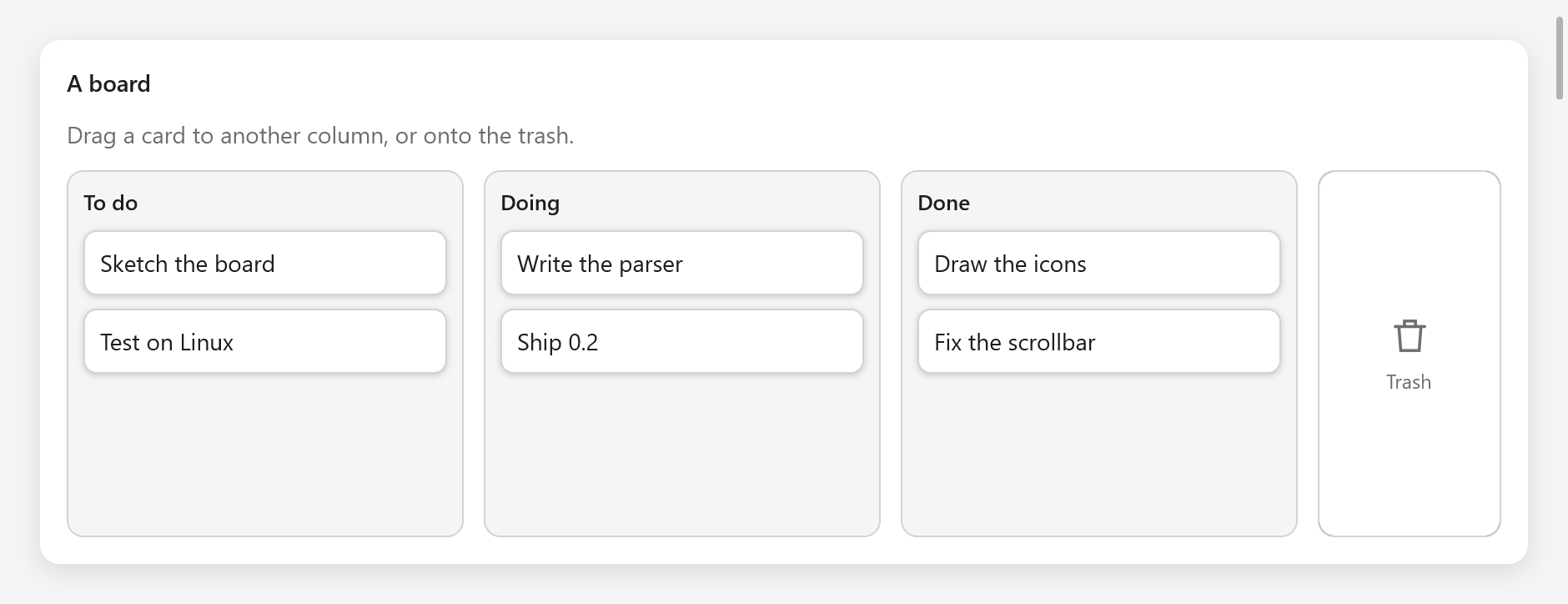
Draggable task cards in To do, Doing and Done columns, beside a trash target.
A board of cards
const std = @import("std");
const myzig = @import("myzig");
const ui = myzig.ui;
const transfer = myzig.transfer;

const Task = struct { id: u32, title: []const u8, column: u8 };
const columns = [_][]const u8{ "To do", "Doing", "Done" };

const Board = struct {
    gpa: std.mem.Allocator,
    tasks: [32]Task = undefined,
    count: usize = 0,
    dnd: ui.DragDrop = .{},

    fn deinit(b: *Board) void {
        b.dnd.deinit();
    }

    fn view(b: *Board, c: *ui.Context) void {
        const th = c.theme;
        const fmt = transfer.value_format(Task);
        ui.row(c, .{ .width = .fill, .height = .fill, .gap = 12, .padding = .all(16), .align_items = .stretch });
        defer ui.end(c);
        for (columns, 0..) |name, col| {
            // A target: a box opened before its children.
            const zone = c.open(.{ .grow = 1, .padding = .all(10), .gap = 8, .radius = 10, .border = th.border }, name);
            const t = b.dnd.target(c, zone, .{ .formats = &.{fmt}, .effects = .copy_move });
            if (t.over) c.node(zone).style.border = th.accent;
            ui.text(c, name, .{ .weight = .semibold });
            for (b.tasks[0..b.count]) |*task| {
                if (task.column != col) continue;
                ui.key(c, c.print("task-{d}", .{task.id}));
                var d = b.dnd.draggable(c, .{ .width = .fill, .padding = .all(10), .radius = 8, .background = th.surface }, .{ .effects = .copy_move });
                if (d.starting) if (transfer.valueData(b.gpa, Task, task)) |data| d.offer(data) else |_| {};
                ui.text(c, task.title, .{});
                _ = d.end();
            }
            c.end();
            if (t.dropped) |drop| if (drop.data.value(Task)) |task| {
                task.column = @intCast(col);
            };
        }
        b.dnd.preview(c); // last: the copy that follows the pointer
    }
};
The app keeps one ui.DragDrop per window, and frees it with deinit().
Sources
dnd.draggable(c, style, opts) opens a box styled with style whose children follow, then end(). In the frame the pointer pressing it has moved far enough, starting is true: offer(data) starts the drag with the data, which the drag then owns. A draggable that does not offer anything stays a press, so a row can drag only some of the time.
ui.DraggableOptions:
| Field | Default | |
|---|---|---|
effects | copy | what a drop may do with the data: transfer.Effects (.copy, .move, .link, or .copy_move) |
count | 1 | how many values the drag holds, shown beside the pointer when several (the rows chosen in a list, dragged together) |
dim | true | dims the box while its data drags |
end() returns whether it is dragging, and finished, a ui.DragFinished, in the frame its drag ended: the effect the target did (.move means the source removes its value) and canceled (Escape, or let go over nothing that takes it); escaped tells a drag given up (Escape, cancel()) from one let go over no target, and screen is where a drag that went on in the system's ended, in screen points (Data transfer).
if (d.end().finished) |f| {
    if (f.effect == .move) s.remove(task.id);
}
Key draggables in a loop with ui.key, so that a drag keeps its source as items above it come and go.
Targets
dnd.target(c, index, opts) makes the box index (from c.open) a target, before its children are built. It returns a ui.DropTargetResult: over, while data it would take drags over it (highlight it then), and dropped, a ui.Drop, in the frame data was let go on it.
ui.DropTargetOptions has formats (the formats it takes; empty takes any), effects (copy) and disabled.
A ui.Drop has the data, valid until the next frame (read it, or clone it to keep it), the effect agreed and at, where the pointer let go, in window points. When both ends allow several effects, copy is preferred, and holding Shift asks for a move; a target can also read the modifiers (c.input.ctrl, c.input.shift) to decide itself.
The data can be read in any of its formats:
data.value(T)returns the*Tatransfer.valueDatadrag carries, for drags within the app, matched bytransfer.value_format(T).data.read(allocator, format)returns the bytes of a format, made when asked for those offered lazily.data.files(allocator)returns the paths oftransfer.file_listandtransfer.uri_listdata.data.preferred(&wanted)picks the first format ofwantedit has.
The preview
dnd.preview(c) draws the copy of the source that follows the pointer, over everything: call it once, last in the view. dnd.dragging() is true while data drags, and dnd.cancel() gives the drag up from code.
Out of the window, and into it
A drag leaves the window in the system's drag and drop when the DragDrop has an external: myzig.systemDrag(window) returns one where myzig has the system's drag (Windows, through OLE) and null elsewhere, where drags stay in the window.
const win = try app.newWindow(.{
    .title = "Board",
    .on_drop = .of(&board, Board.droppedFiles),
    .content = .{ .view = .init(&board, Board.view) },
});
board.dnd.external = myzig.systemDrag(win);
Data dragged out can offer several formats, some made only when a target asks (transfer.lazy): a note as text for a text editor, and as JSON for another window of the app. transfer.fileData(gpa, paths) drags files to a file manager.
Files dropped on a window from a file manager or another app come to the window's on_drop callback, fn (ctx, *myzig.Window, paths: []const []const u8) void; wrap them in transfer.fileData to hand them to the same code as drops within the window. See examples/drag-drop for two windows that drag notes, text, URLs and files between each other and other apps, and Data transfer for the formats.
Testing
ui.Tester.drag(x1, y1, x2, y2) presses at one point, moves past the threshold to the other and lets go, and moveTo moves the pointer step by step, to check a target's highlight on the way (see Testing). Drags in tests never touch the system's drag and drop.